OpenText: Introducing Application Observability
This case study describes my work at OpenText from 2022 to 2026 where I designed application observability products that helped DevOps professionals identify problems in their IT systems.
I was brought on in November 2022 to build an application observability product. The team I joined was from Micro Focus, a recent acquisition of OpenText. The flagship product was Operations Bridge, an enterprise AIOps IT monitoring platform. Today the tool is known as OpenText AI Operations Management. My role as lead UX designer was to overhaul the product to take advantage of new capabilities provided by OpenTelemetry and to update the look and feel of the product so that it reflected the look and feel of OpenText’s brand.
The first initiative I worked on was building an observability tool to validate OpenTelemetry as a viable new technology capable of replacing the legacy systems that powered existing products.
Designing With Customers
The first version of the application observability app was designed with select design partners who could stress test our product and steer it towards the most effective use cases. My role was lead UX designer as part of a product trio (development, product management, and design) where I designed interfaces, validated concepts with customers, built prototypes, and conducted usability sessions.
One of my first tasks in designing the product was to identify the key workflows that our application needed to support. To do this, I used Miro and Figma to map out the primary tasks that users would perform. These workflows were created in collaboration with my product management counterparts. Together we identified “troubleshooting” as the first workflow we wanted to support. In short, “When something goes wrong, how do I diagnose the problem so that I can fix it?” The image below shows some of the artifacts of taking the product from workflow diagrams to sketches to prototypes.
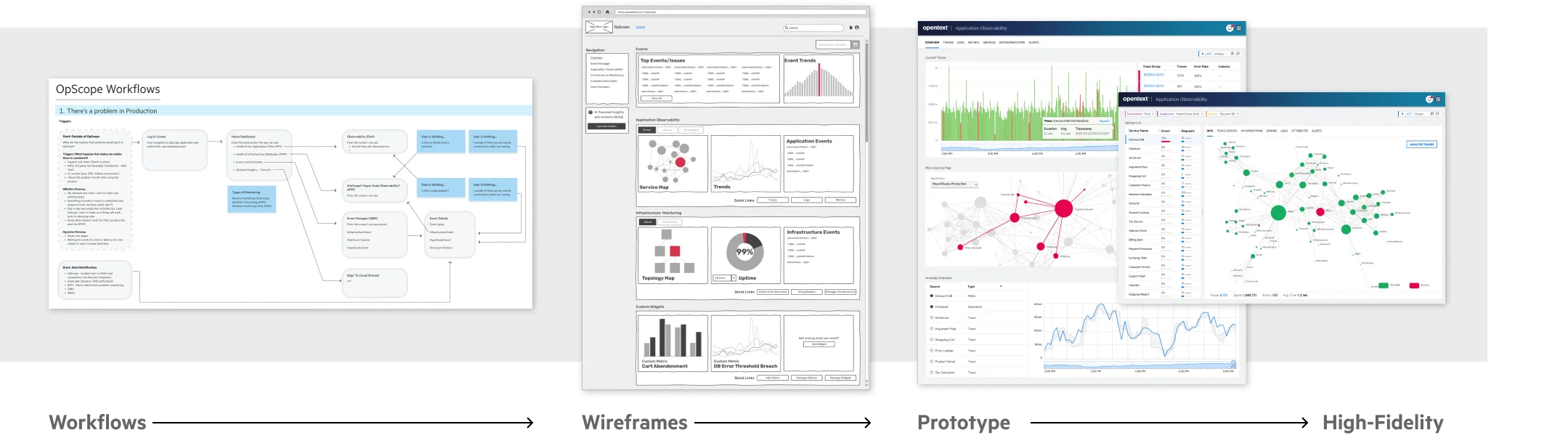
From workflow diagram to wireframes to prototype
I believe it is important to start at low fidelity. By quickly sketching wireframes in Figma I was able to refine ideas and get alignment between my partners in Product and Engineering. Once the wireframes were developed to a point where we felt they were ready to be validated with users, I showed them to the IT professionals in our office to confirm that we were indeed on the right track.
With validated wireframes, I then moved into the prototype phase where I used Figma to build interactive prototypes. The prototypes were used to get feedback from customers. We met regularly with customers who signed up to be “design partners” and revised our designs based on their feedback. With each iteration of the prototype, the designs were refined and improved. I already mentioned my collaboration with product managers, but throughout this phase of the product design I was also working in collaboration with our engineering leaders. This is important because it allowed our developers to begin working on the product before designs were completely finalized. In the spirit of agile development, we embraced collaboration over waiting for official approval before starting development.
Understanding the SRE
OpenText already had an assortment of user personas but they were mostly based on legacy patterns of IT management. Because the product was focusing on an emerging technology (OpenTelemetry) it was important to create a new persona based on where the industry was going. This persona is called a Site Reliability Engineer (SRE). I created a living document that loosely described the SRE persona and then began a user study where I talked to a dozen SREs. I used empathy mapping techniques to document the jobs of SREs, collected a list of pain points, and highlighted the gains that would benefit our users.
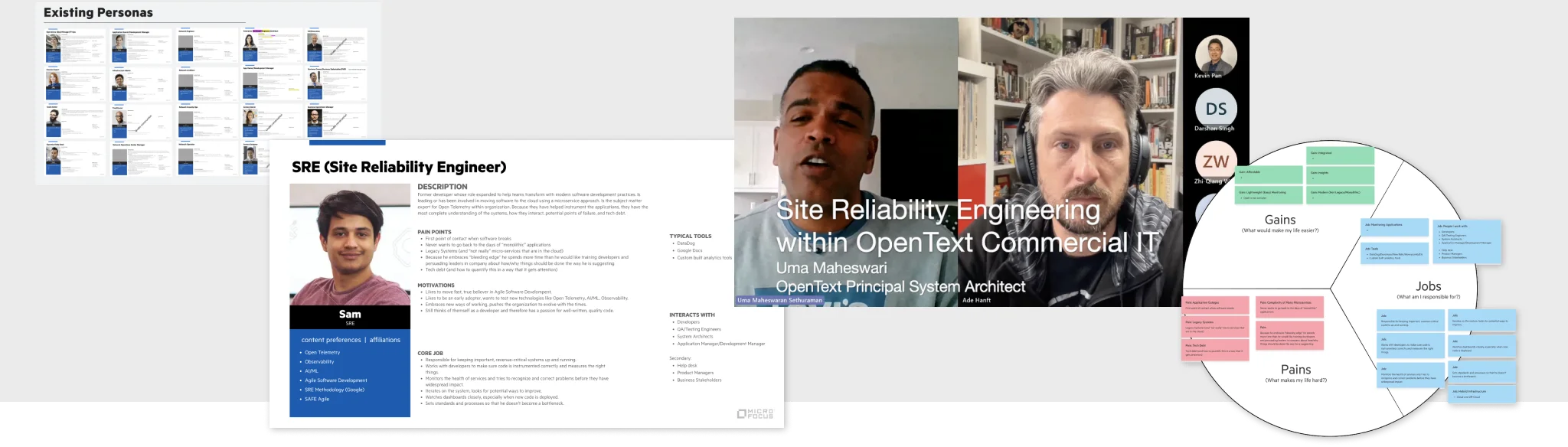
Researching the Site Reliability Engineer
Surfacing the Golden Signals
Engineers who monitor the systems of large enterprise software environments work in an interesting problem space. Anything can go wrong at any time for any reason. With so many unknowns, how do you predict and prevent problems before they happen? One approach is to monitor the “golden signals” of the system: errors, latency, and throughput. I designed the main screen of the observability tool to display these signals. The idea was that the first screen should tell the user where potential problems were happening across potentially thousands of apps in their system. The dashboards I designed were all based on surfacing these signals as the beginning of workflows that allowed engineers to take action on the problems they identified.
Within an OpenTelemetry-instrumented system there are three types of data that carry the signals: Traces, Metrics, and Logs.
Starting With Traces
The first version of our application observability tool leveraged traces. You can think of a trace as a map of everything that happens as the code executes within software. I designed a trace viewer, a trace summary view, dashboard widgets, and integrations with our event manager.
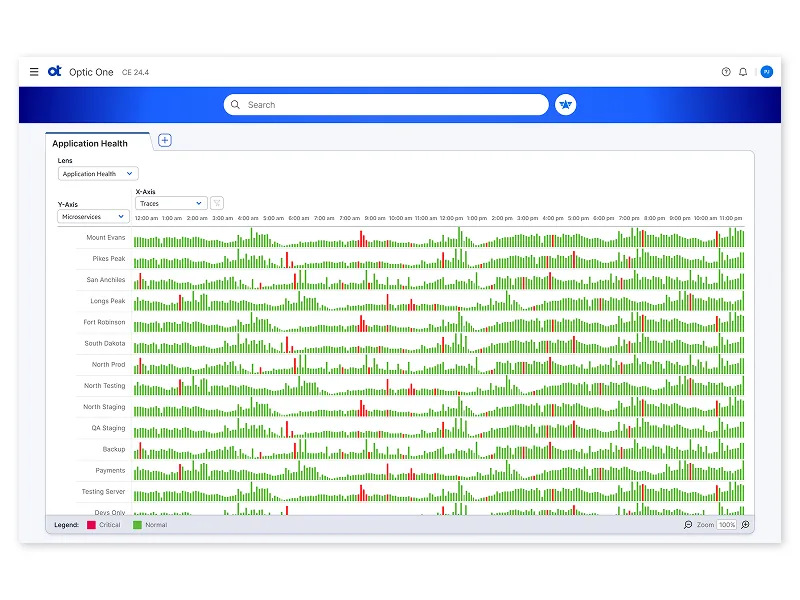
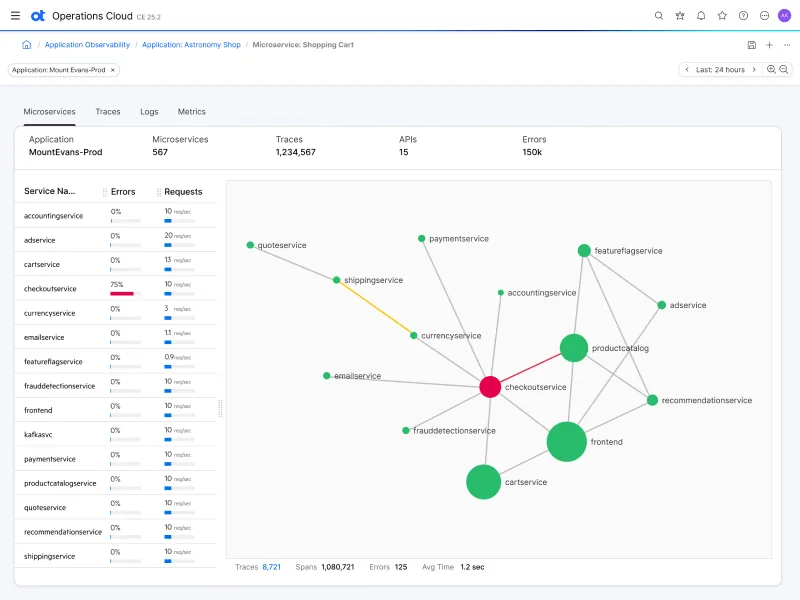
Application health across microservices
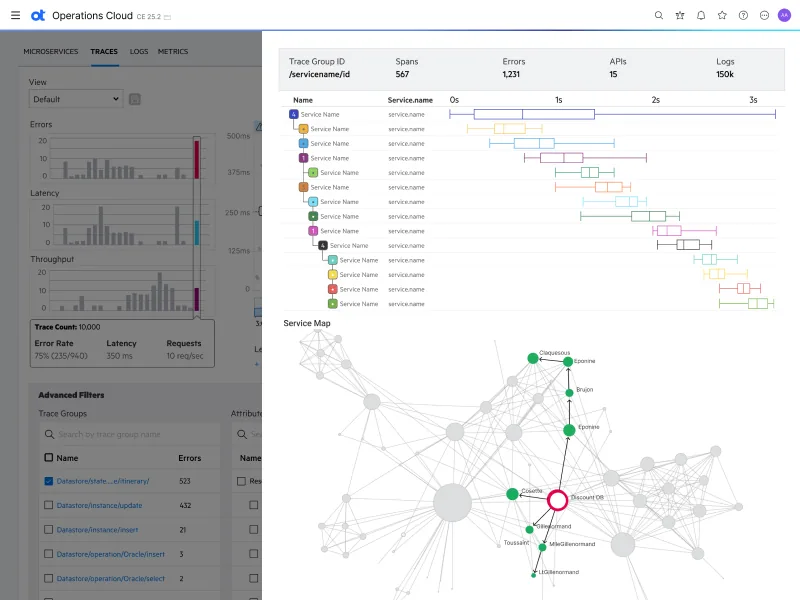
Trace details and the service map
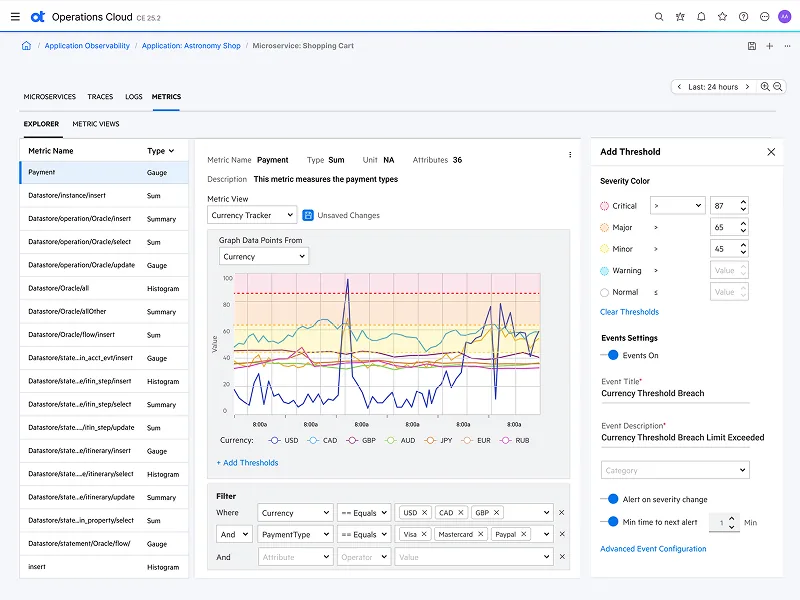
Exploring metrics and setting thresholds
The initial workflows focused on navigating from an application overview down to problem areas by filtering through microservices, transactions, and traces until you arrived at the exact log/span details where the errors occurred. Before landing on the designs above I explored different ways to represent information through data visualizations. Behind the scenes, modern software products can have hundreds of microservices communicating with each other. This isn’t a static system, it is more like a constantly changing living organism. When a problem occurs it is difficult to pinpoint what is causing the issue. Below are some of my explorations around different ways to visualize the system data.
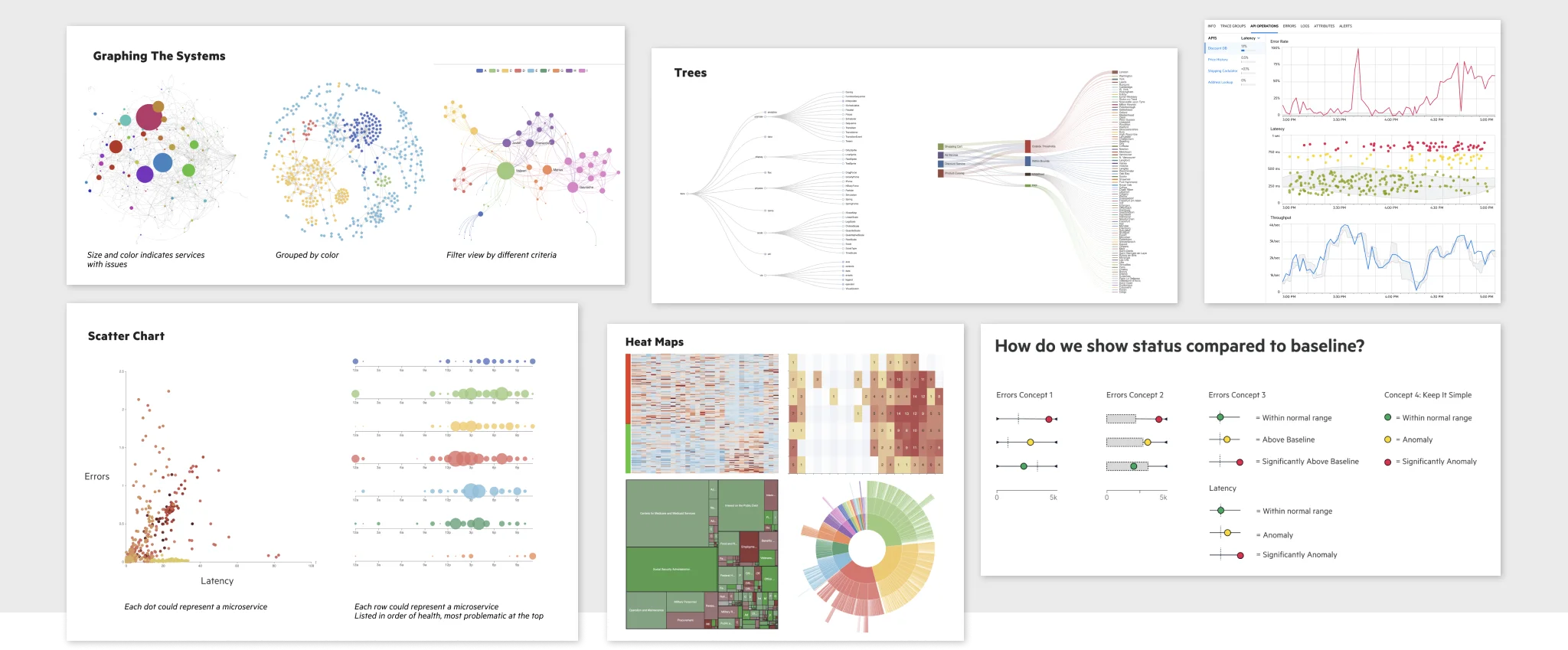
Data visualization explorations
Creating novel data visualizations is a heavy engineering task. When going beyond standard line graphs and bar charts, you quickly hit the limits of off-the-shelf charting libraries such as Highcharts or ECharts. We used D3, a library that, although it comes with a steep learning curve, allowed our developers to support the types of data visualizations that would set our product apart from the competition.
Designing for Anomaly Detection
Anomaly detection was also an important part of the planning of our observability tool. Our team had data scientists designing machine learning and evaluating AI as ways to identify anomalous data in our system. I helped prototype these ideas because identifying unexpected data patterns is only one half of the equation. Once data is flagged, what you do with this information is a user experience problem. Below are some artifacts showing how I was thinking about how to present AI identified patterns to users without overwhelming them with unwanted noise.
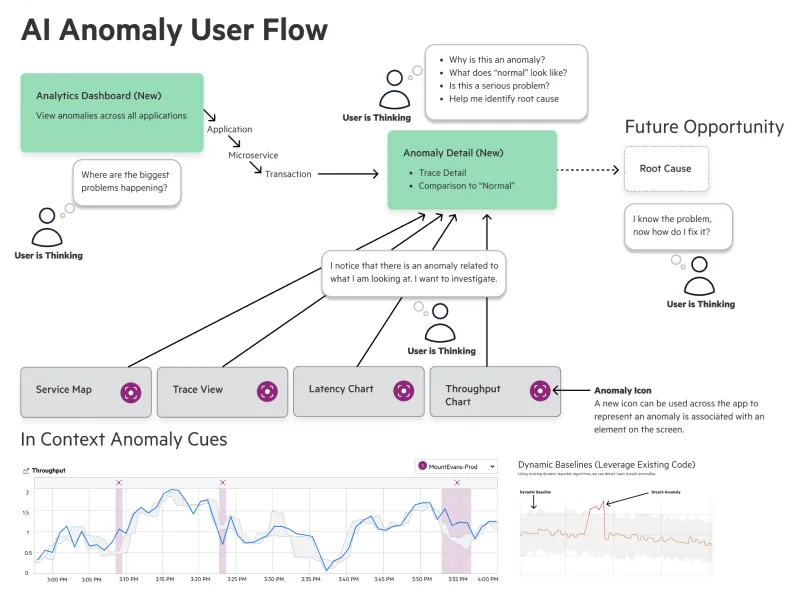
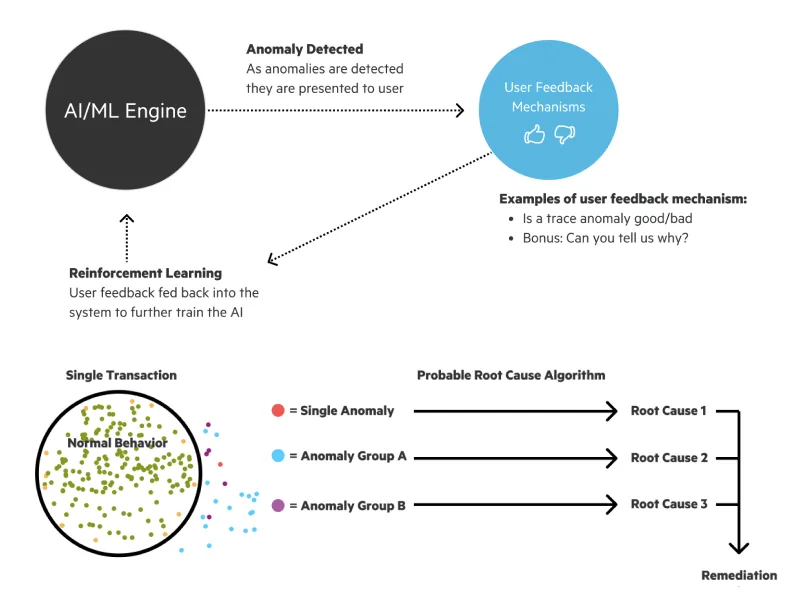
Like so many companies, OpenText was embracing artificial intelligence and working to leverage machine learning and large language models in its products. Sometimes lost among the excitement of AI/ML potential are the UX challenges that these new technologies present. As I worked with our data scientists I found myself talking about trust as the primary driver of good UX in products that leverage AI/ML/LLMs. For example, ML can be used to detect anomalies, but when that anomaly is presented to a user, how will that person be able to understand why it is anomalous? Often the reason is opaque because the algorithms that flagged it are based on models that aren’t easily parsed into human language. The user ends up having to fact-check the AI/ML because the user can’t trust the results yet. There were similar UX challenges with the ChatGPT implementations. I found that there was real skepticism from users as they chatted with an AI. The promise of AI/ML/LLMs is that they will reduce the work of humans, but if we aren’t careful we will actually increase the work of users because now they have to fact-check and babysit a not-yet-fully-developed AI. This is an unsolved problem, and a UX opportunity that I look forward to solving as AI changes our world.
Planning With a UX Blueprint
To keep development teams aligned, I maintained a UX blueprint for the observability product. Each quarter as we planned our upcoming work, the UX blueprint guided teams around the problems we wanted to solve and suggested direction without locking teams into a pre-decided solution. This is important because planning tends to be an exercise of managing many competing priorities and initiatives. As teams committed to work and the scope of the projects hardened I iterated on the designs to represent what our team was actually going to build.
Expanding Into Logs
The success of the product trials expanded the product’s scope, and we began transitioning legacy products to OpenTelemetry. We chose Logs as the first feature to expand into because it was something that was used by many product areas. Logs are a more universal signal than traces (nearly all software produces logs) so the new log tool was designed to work broadly across applications, network, infrastructure, and any product that could benefit from log analysis.
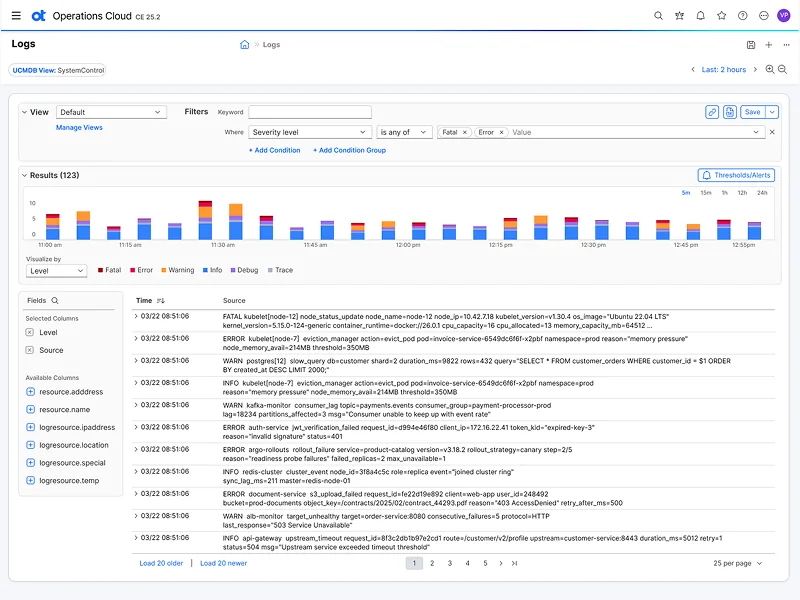
The log explorer
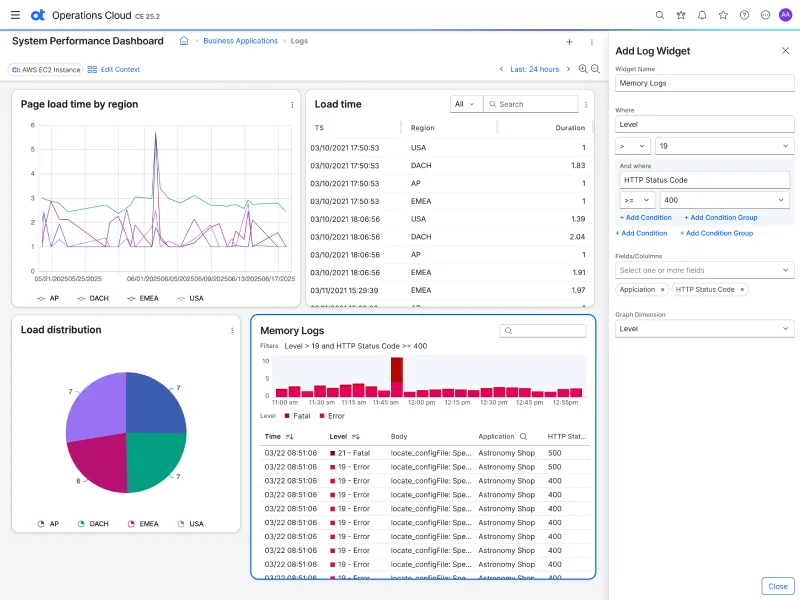
Adding a log widget to a dashboard
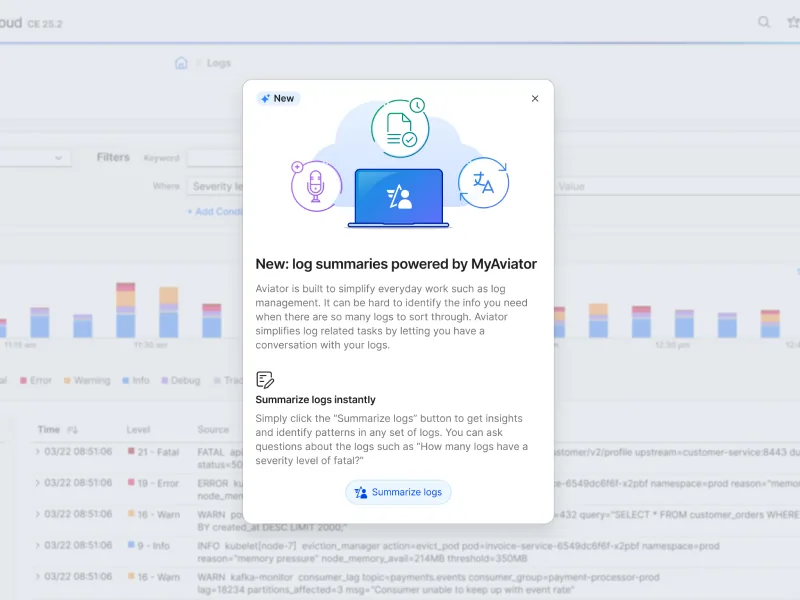
AI log summaries with Aviator
Bringing the Product Into JATO
About a year into my work on the observability product, the OpenText acquisition had finalized to a point where we could rebrand Operations Bridge as an OpenText product. Across OpenText a rebrand initiative called JATO (Jet Assisted Takeoff) was an effort to modernize and unify the look of products and integrate new AI “Aviator” features.
The new JATO design system was a collaborative effort and I was one of a dozen designers who submitted design concepts for how OpenText products could be reimagined.
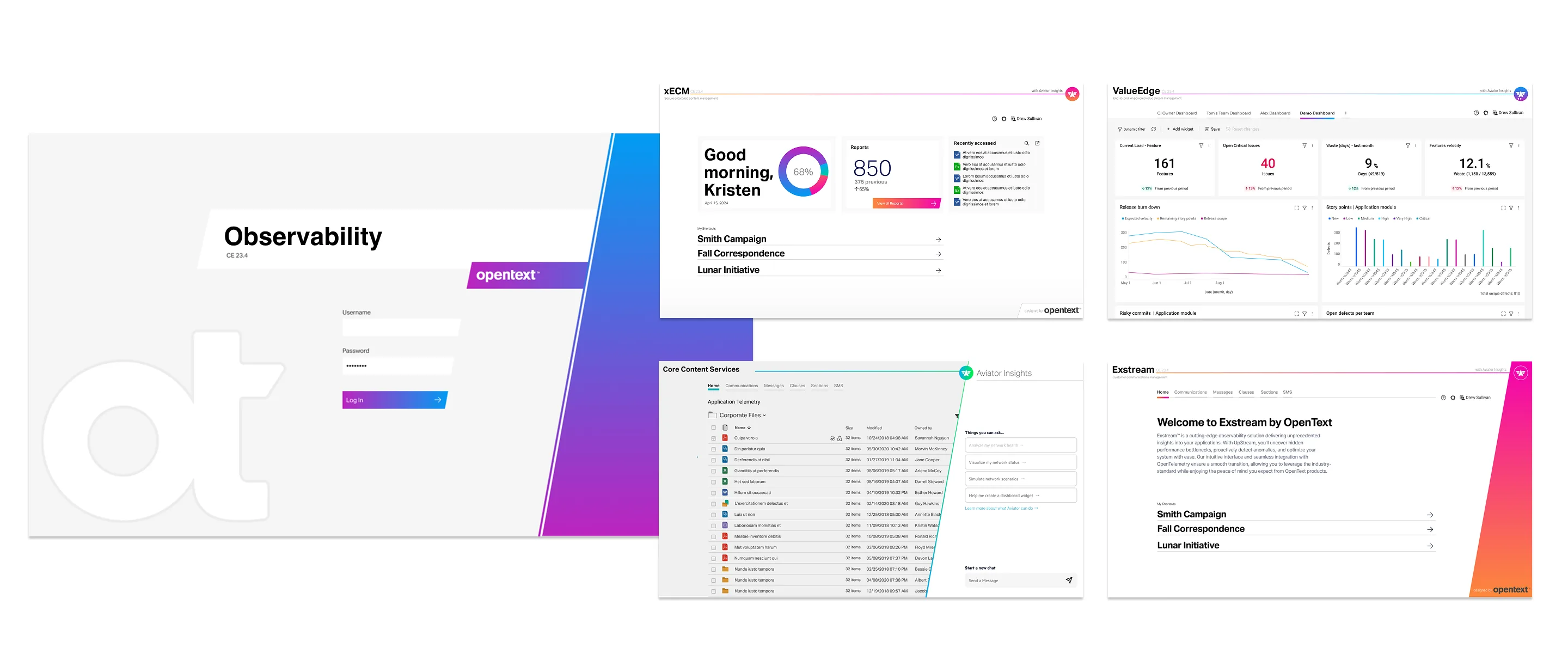
After the design exploration phase concluded the designs were converted to components and documentation in a Figma design library. I was not an official member of the design system team but I contributed patterns and represented the AIOps products to voice concerns regarding the design patterns that were unique to application observability.
Once the new design system was ready to roll out, I applied the new design language to every screen of our product and redesigned interfaces to conform with the new JATO design elements.
Dark mode was a feature I often heard customers requesting, and my team was already working on it before it became a JATO initiative. The designs below show how our product looked in dark mode and some of the rationale behind the feature.
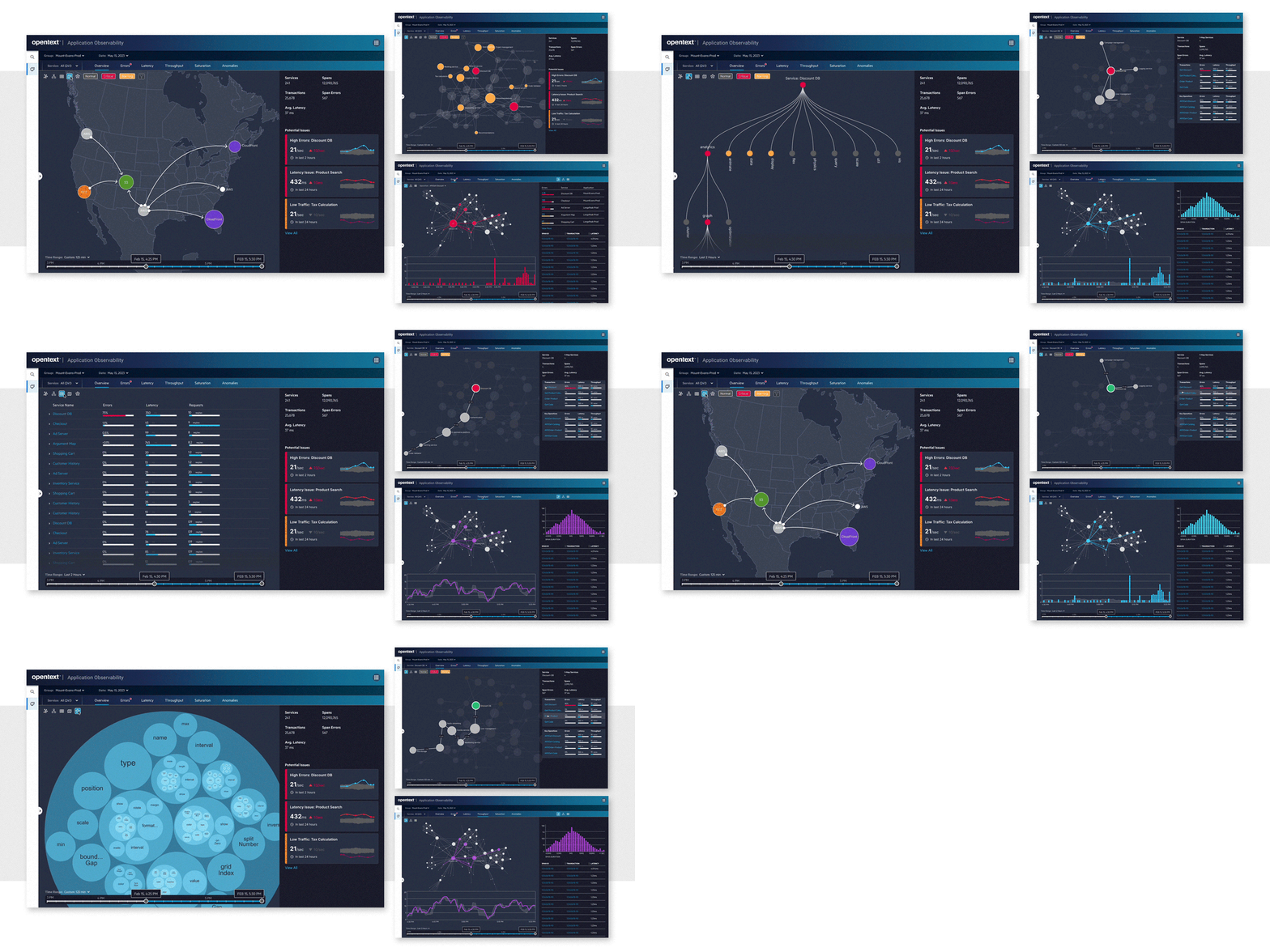
Dark mode
Testing With Customers at OpenText World
Every year OpenText hosts its premier customer showcase called “OpenText World.” In the main hall of the convention is an Innovation Lab where the UX team showcases new products and tests the usability of new products. With over 100 designers employed by OpenText there is competition to be selected to participate in the event. I was one of about ten designers facilitating the Innovation Lab over 3 years in Las Vegas and Nashville.
Because so many customers attend OpenText World, the UX team was able to conduct over 100 usability tests over the course of two days. These moderated tests were scripted, data was carefully collected, and the results were formally presented to the product teams after the event. I had done usability testing in the past on a smaller scale, but this was the largest and most organized research project I have been a part of.
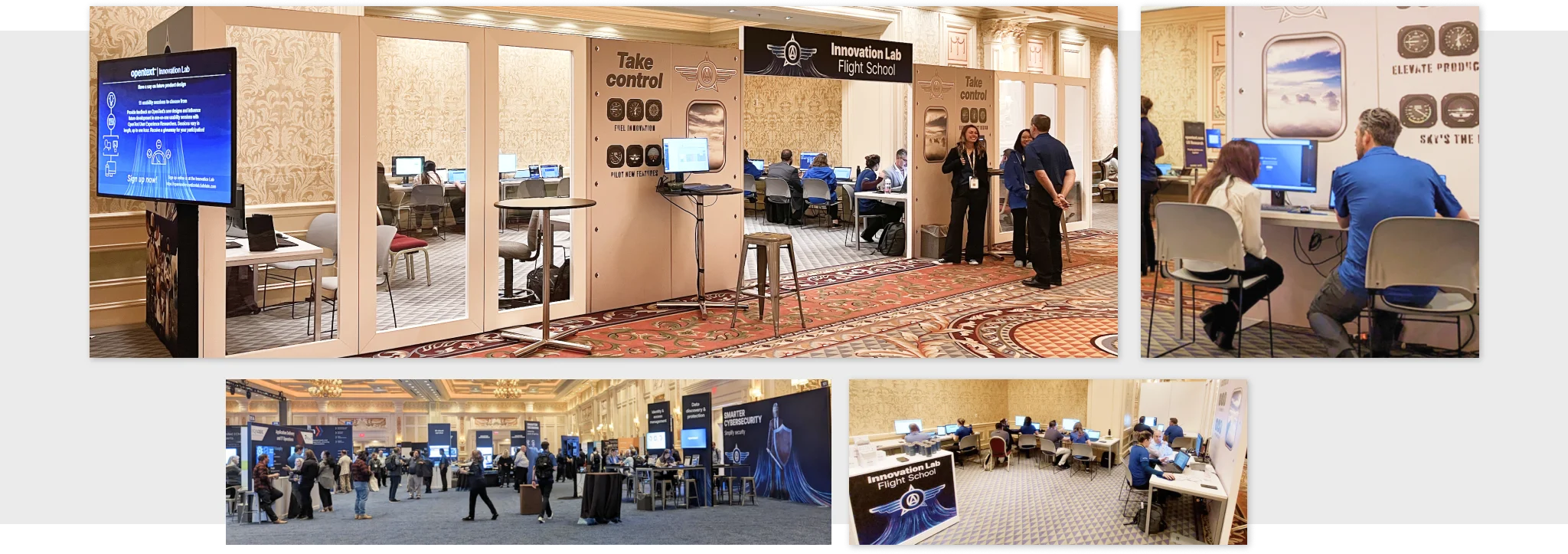
The Innovation Lab at OpenText World
My testing at OpenText World identified several areas where users struggled with our product. For example, the discoverability of one of our main screens was suffering due to an obscure icon placed oddly in the UI. This was a known UX issue, but it was only after I demonstrated that every participant failed to find the screen that our UX fix could be prioritized. Armed with data and stories from the users, I returned home to present my findings to our teams and stakeholders.
Looking Ahead
As part of an internal hackathon week, our team imagined what our product would look like as a VR app. We transformed our flat, 2D graphs into immersive 3D environments where users could walk inside their data as if it were a galaxy of stars. By changing attributes in the data we noticed that the data constellations clustered in interesting ways, allowing users to see relationships that wouldn’t be possible in traditional 2D graphs. Our VR prototype won second place, and while we never shipped a VR app, the exercise let us look at our product from a novel perspective.
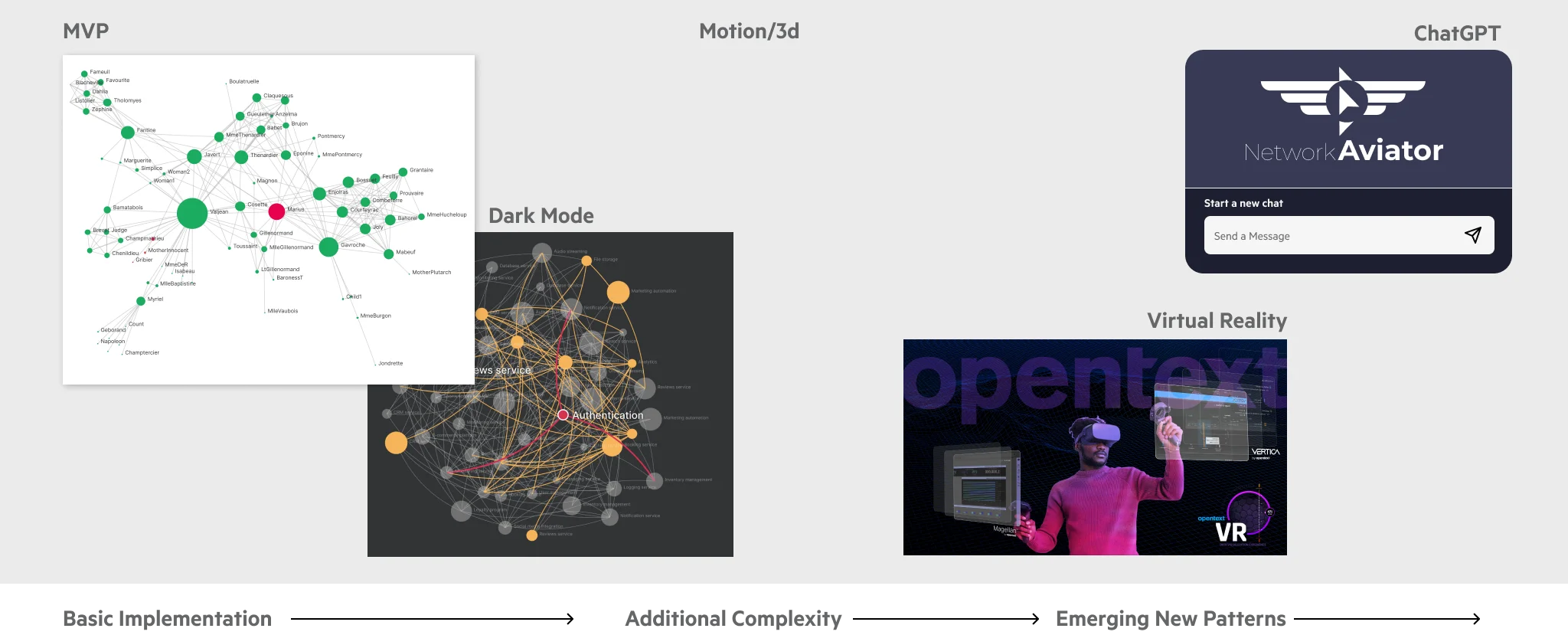
Experiments in 3D, chat, and VR